

What does C0800 mean?
C0800 is an enhanced chassis code, and its meaning and test path must be confirmed for the exact VIN, reporting module and symptom byte. GM service information identifies it as Control Module Power Circuit and shows it stored in the EBCM on some applications.
Always record three things before clearing the code:
- Which module stored C0800. A code in the EBCM does not necessarily have the same diagnostic path as one in the power-steering module.
- The symptom byte. Enhanced scan tools may display C0800:00, C0800:03, C0800:07 or a similar suffix. That suffix narrows the electrical failure type.
- Current versus history status. A history code after a flat battery is different from a current code that immediately resets.
Possible symptoms and companion codes
Depending on the vehicle and the module affected, a driver may see an ABS lamp, Service Stabilitrak, Service AWD, Service Power Steering, a low-battery message, intermittent no-start or a temporary loss of steering assist. The vehicle may also store network codes such as U0121 or U0136, low-voltage codes such as P0562, or wheel-speed-sensor codes such as C0035, C0040, C0045 or C0050.
Those companion codes are evidence, not clutter. For example, a GM bulletin for certain 2013 Buick and Chevrolet models says that when C0800 symptom 07 appears with a wheel-speed-sensor code, technicians should repair the wheel-speed-sensor fault first and not replace the EBCM merely because C0800 is present.
Most likely causes
- Weak or discharged 12-volt battery. Cold weather, age, repeated short trips or a parasitic draw can pull module voltage below its operating range.
- Loose, corroded or overheated connections. Check battery terminals, high-current fuses, junction blocks, module power feeds and chassis grounds.
- Charging-system fault. An alternator, DC/DC converter on an electrified vehicle, belt or control issue can create low or unstable voltage.
- Harness or connector damage. Opens, high resistance, fretting corrosion, water intrusion and backed-out terminals can interrupt a module's power or ground.
- A related sensor or network fault. The C0800 entry may be secondary to a wheel-speed-sensor or communication problem.
- Software or control-module fault. This is possible, but it should be considered only after power, ground, connectors and applicable service bulletins are checked.
How to diagnose C0800 in the right order
1. Preserve the evidence
Run a complete vehicle scan before disconnecting the battery. Save the module name, full code including suffix, current/history status, freeze-frame data and every related low-voltage or communication code. Clearing everything first can erase the clue that identifies the original failure.
2. Check the 12-volt system
Inspect the battery case and terminals, then test battery state of charge and health with equipment suitable for the battery type. Verify charging-system operation under the OEM procedure. Do not condemn a module while system voltage is unstable. If P0562 is also present, use our P0562 low-system-voltage guide as the starting path.
3. Inspect power distribution and grounds
With the correct wiring diagram, identify every power feed and ground for the module that stored C0800. Inspect the related fuse and junction blocks for looseness, corrosion, heat damage or evidence of arcing. A connection can pass a no-load voltage check and still fail under load, so use an OEM-approved voltage-drop or loaded-circuit test. Never probe a terminal with an oversized test lead that can spread it.
4. Use the other codes to set priority
If wheel-speed, steering, AWD or network codes are present, follow the OEM diagnostic order. Repair a confirmed sensor, wiring or communication fault, clear the codes, cycle the vehicle and scan again. For broader network symptoms, see the U0073 CAN-bus diagnostic guide.
5. Inspect the module connector
Only after the battery and external circuits pass should you disconnect the affected module—following OEM power-down precautions—and inspect its connector for water, corrosion, bent pins, poor terminal tension or backed-out terminals. Repair wiring with approved methods; do not add resistance with improvised splices.
6. Check software and bulletins before replacement
Some model-specific GM communications direct technicians toward a software update or a known connection issue. Confirm by VIN. If reprogramming is required, maintain stable battery support and follow the manufacturer's procedure. Module replacement may require setup, programming or calibration and should be the last step, not the first.
Repair paths and common mistakes
| Finding | Likely action | What to verify afterward |
|---|---|---|
| Battery fails health or state-of-charge test | Charge or replace it using the vehicle-specific procedure | Stable voltage, no recurring low-voltage codes |
| Loose/corroded terminal, fuse or ground | Clean, repair or replace the affected connection; torque to OEM specification | Low voltage drop under load |
| Companion wheel-speed-sensor code | Diagnose sensor, tone ring, hub and circuit first | Wheel speeds agree and C0800 does not return |
| Harness or connector damage | Repair wiring and terminal fit with approved parts | Continuity/load test passes; no intermittent dropouts |
| Applicable software bulletin | Perform the specified update with stable battery support | Post-programming scan and required calibrations complete |
Avoid three expensive shortcuts: replacing the EBCM without testing its feeds, installing a battery without checking the charging system, and relying on a generic code definition that ignores the symptom byte.
How an iCarsoft scanner helps
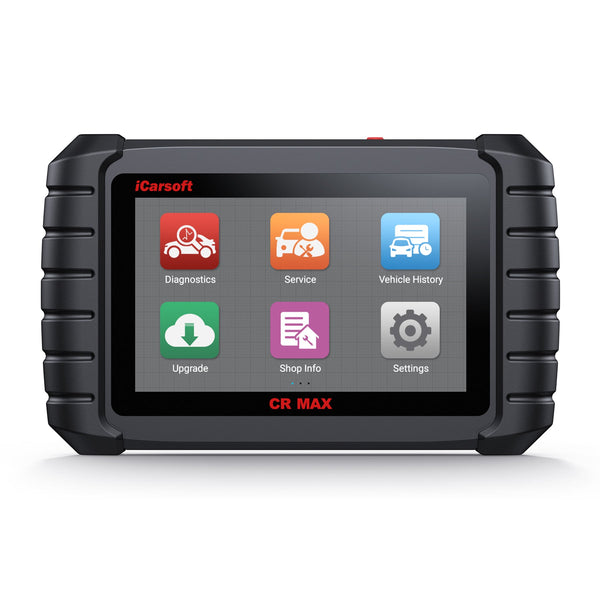
A basic engine-only reader may not show the EBCM or steering module that actually stored C0800. The iCarsoft CR MAX provides full-system scanning, enhanced chassis codes, live data and supported active tests across many makes. For this job, use it to identify the reporting module, save all related codes, review battery voltage reported by multiple controllers and compare wheel-speed data where supported.
Coverage and available tests vary by make, model, year and module. Confirm vehicle coverage before purchase. A scanner does not replace a wiring diagram, a properly rated digital multimeter or OEM safety procedures.
Frequently asked questions
Can a weak battery cause C0800?
Yes. On applications where C0800 is defined as a module power-circuit code, low or unstable 12-volt supply can be a cause. Test the battery, charging system and connections before replacing a control module.
Does C0800 mean the ABS module is bad?
No. The code may be stored in the EBCM, but that does not prove the module has failed. GM has published model-specific guidance telling technicians not to replace the EBCM when certain companion wheel-speed codes are present.
Can I clear C0800 and keep driving?
Clearing the code does not repair the cause. If it was a history code after a discharged battery and it does not return after the battery system is restored, continued observation may be reasonable. If braking, steering or stability-control behavior changes, stop driving and have the vehicle inspected.
Why does my scanner show C0800:07?
The “07” is a symptom byte that adds failure information. Its exact interpretation and test sequence depend on the module and vehicle. Record it and use VIN-specific service information.
- GM Bulletin 18-NA-007: C0800 Control Module Power Circuit
- GM PIC5837: C0800 symptom 07 with wheel-speed-sensor codes
- GM PIT5739: C0800 stored in the EBCM
These manufacturer communications apply only to the listed vehicles and conditions; use VIN-specific service information for the final repair.


