

iCarsoft TPMS service guide · sensor and vehicle workflow
TPMS relearn vs sensor programming is a comparison between three separate jobs. Activation wakes a compatible direct tire-pressure sensor so a tool can read its radio transmission. Programming writes an ID or vehicle protocol into a supported blank replacement sensor. Relearn teaches the vehicle which sensor IDs or wheel positions it should recognize.
Scope: passenger-vehicle TPMS service planning using official iCarsoft product resources and U.S. tire-safety guidance checked October 17, 2026. Procedures, frequencies, sensor types and module access vary by vehicle, market and installed equipment. Generated images are illustrative. The vehicle service information and sensor instructions control the job.
Are TPMS activation, programming and relearn the same?
No. Each task changes or verifies a different part of the system. Activation is a read operation at the wheel. Programming changes a compatible replacement sensor. Relearn changes or confirms vehicle-side identification. The words can appear close together in a tool menu, but treating them as synonyms causes many failed replacements.
| Task | Acts on | Main purpose | What success proves |
|---|---|---|---|
| Sensor activation | Installed or loose direct sensor | Wake the sensor and read available ID, pressure, temperature, frequency or status data | The sensor responded to the supported trigger and its data was received |
| Sensor programming | Compatible programmable replacement sensor | Write an ID or application protocol by copy, manual entry or automatic creation when supported | The target sensor accepted the programmed information |
| Vehicle relearn | Vehicle TPMS controller or learning logic | Associate sensor IDs, locations or a new pressure baseline with the vehicle | The prescribed learn routine completed, subject to final verification |
A sensor may activate correctly but still be incompatible with the vehicle. A sensor may program correctly but remain unknown to the vehicle until relearn. A vehicle may complete a relearn and still display a warning because a tire is underinflated, a sensor battery is weak, the wrong frequency was used or another fault remains.

How do direct and indirect TPMS change the workflow?
First identify the system type. NHTSA describes direct TPMS as measuring pressure with sensors located in the tires. Indirect TPMS uses wheel-speed and other vehicle data to estimate a pressure difference. That distinction determines whether there is an in-wheel radio sensor to activate or program.
Direct TPMS
Each wheel normally has a pressure sensor and transmitter. Service may involve activation, sensor identification, replacement-sensor programming and a vehicle relearn. The exact frequency, protocol, mounting hardware and learn method remain application-specific.
Indirect TPMS
The vehicle derives a pressure-loss indication from existing inputs rather than reading pressure from a replaceable valve sensor. Tire service may require a dashboard or scan-tool initialization and a prescribed driving learn, but there may be no sensor to activate or program.
Do not infer system type only from the warning symbol. Confirm with the owner manual, service information, valve hardware, vehicle data and the exact application. Some platforms change design across years or trims. A procedure that works on one model year can be wrong for the next.
What does TPMS sensor activation do?
Activation sends a low-frequency trigger or uses another supported wake method so a direct sensor transmits. A TPMS tool can then display the data that the sensor broadcasts, which may include its identifier, reported pressure, temperature, frequency or battery/status information. Available fields depend on the sensor and tool.
Activation is useful before disassembly because it helps identify which wheel responds, preserves the original IDs and reveals an obvious no-response condition. It is also useful after installation to confirm that a sensor can transmit. However, it does not prove that the vehicle has learned the sensor or that the displayed pressure agrees with a calibrated mechanical gauge.
A no-response result is evidence, not an automatic authorization to replace the sensor. Verify tool position, selected make and year, expected frequency, tire location, interference and the vehicle procedure. Some sensors are difficult to wake when mounted or asleep; some vehicles use indirect TPMS and have no wheel transmitter to trigger.
When does a TPMS sensor need programming?
Programming is needed when the chosen replacement sensor is designed to receive application data before it can imitate or replace the original. Supported methods can include copying a readable original ID, manually entering an ID, or automatically creating a new ID. The available choices depend on the sensor family and programming tool.
Programming a sensor is not the same as updating the vehicle controller. The operation writes the replacement sensor itself. If a new ID is created, the vehicle will usually need a relearn or another manufacturer-defined recognition process. If the original ID is cloned correctly, some applications may recognize the replacement without a separate ID-registration step, but that is not a universal promise.
The official TPMS V800 information says the tool can read and trigger many OE and aftermarket sensors, while its programming function is optimized for supported programmable sensors such as the iCarsoft TPMS S6000. That boundary matters: an activatable sensor is not automatically writable, and a blank universal sensor is not automatically compatible with every vehicle.
What does a TPMS relearn teach the vehicle?
A relearn associates the vehicle with the correct sensor identities, wheel locations or monitoring baseline. The procedure may be automatic after a drive, stationary through a vehicle button or ignition sequence, initiated through a scan tool, or completed by writing IDs through the diagnostic connector. Use the method specified for the exact vehicle.
Some routines require sensors to be activated in a precise order, such as left front, right front, right rear and left rear. Others accept ID entry or learn while driving under defined conditions. Do not transfer a sequence from a different make or year. Timing, ignition state, key position, pressure changes and drive requirements can all vary.
A completed relearn does not inflate the tires or repair a leaking valve, damaged antenna, dead sensor battery or wiring problem. Set cold tire pressure to the vehicle placard, inspect the hardware and diagnose current faults. The warning lamp is an outcome to verify, not the only evidence that the system is correct.
What is the correct order for a TPMS sensor replacement?
- Identify the systemConfirm the vehicle, model year, market, direct or indirect design, sensor frequency, OE number and required learn method.
- Inspect and measureSet pressure to the door-placard specification, inspect the tire and valve hardware, scan the TPMS module when supported and save faults and IDs.
- Activate each direct sensorTrigger all wheel sensors in a consistent order and record response, ID, pressure, temperature and status fields that are available.
- Select the correct replacementMatch frequency, protocol, mechanical fit, service kit and vehicle application. Do not rely on appearance alone.
- Program when requiredWrite the supported blank sensor by the chosen method and read it back to verify the stored ID before tire installation.
- Install and relearnUse correct tire-service procedures and torque specifications, then perform the exact stationary, OBD or driving learn.
- Verify the whole systemRescan, activate the installed sensors, confirm positions and pressures, check warning behavior and document the result.
Why does a new TPMS sensor still fail to work?
Wrong system or frequency
The replacement may not match the vehicle's direct system, regional frequency or protocol even if the housing fits.
Sensor was activated, not programmed
Reading a blank sensor proves communication with the tool; it does not prove that the required application data was written.
Sensor was programmed, not relearned
A successful write confirms the sensor, while the vehicle may still need to learn the ID or position.
Incorrect wheel order
A stationary learn can assign positions incorrectly when sensors are triggered in the wrong sequence.
Mechanical or pressure problem
A leaking valve, incorrect cold pressure, damaged sensor or unsuitable service kit remains a physical fault.
Incomplete verification
Clearing a warning without rescanning, checking IDs and confirming all four wheel responses can hide an unfinished job.
When the process fails, stop repeating the same command. Compare the stored and transmitted IDs, confirm the vehicle's expected sensor type, read current TPMS faults and recheck prerequisites. Preserve screenshots or reports so support can see the exact menu path and result.
Wheel rotation adds another decision. Some vehicles display individual wheel positions and need a position relearn after tires move; others identify position automatically or show only a general warning. Record the four sensor IDs and their physical locations before rotation or service. If the display later assigns a pressure to the wrong corner, compare the stored map with those records instead of replacing a sensor that is transmitting correctly.
Keep a final service record with cold pressures, sensor IDs, part numbers, programming method, relearn procedure, fault scan and warning-lamp result. That record separates a later tire-pressure problem from a sensor-recognition problem and helps the next technician confirm whether the vehicle, sensor or tool software changed.
Which iCarsoft tool fits TPMS activation, programming and relearn?
Choose by the exact task, sensor and vehicle. A standard diagnostic scanner may offer vehicle-side TPMS reset or ID functions on supported applications, yet lack the radio hardware needed to activate or program a loose sensor. A dedicated TPMS tool combines sensor-side and vehicle-side operations.
The iCarsoft TPMS V800 lists 315 and 433 MHz activation, supported blank-sensor programming, guided relearn, TPMS diagnostics and ID synchronization, along with broader diagnostic functions. The U.S. listing showed $289.99 and backorder status when checked October 17, 2026. Price, stock and coverage can change.
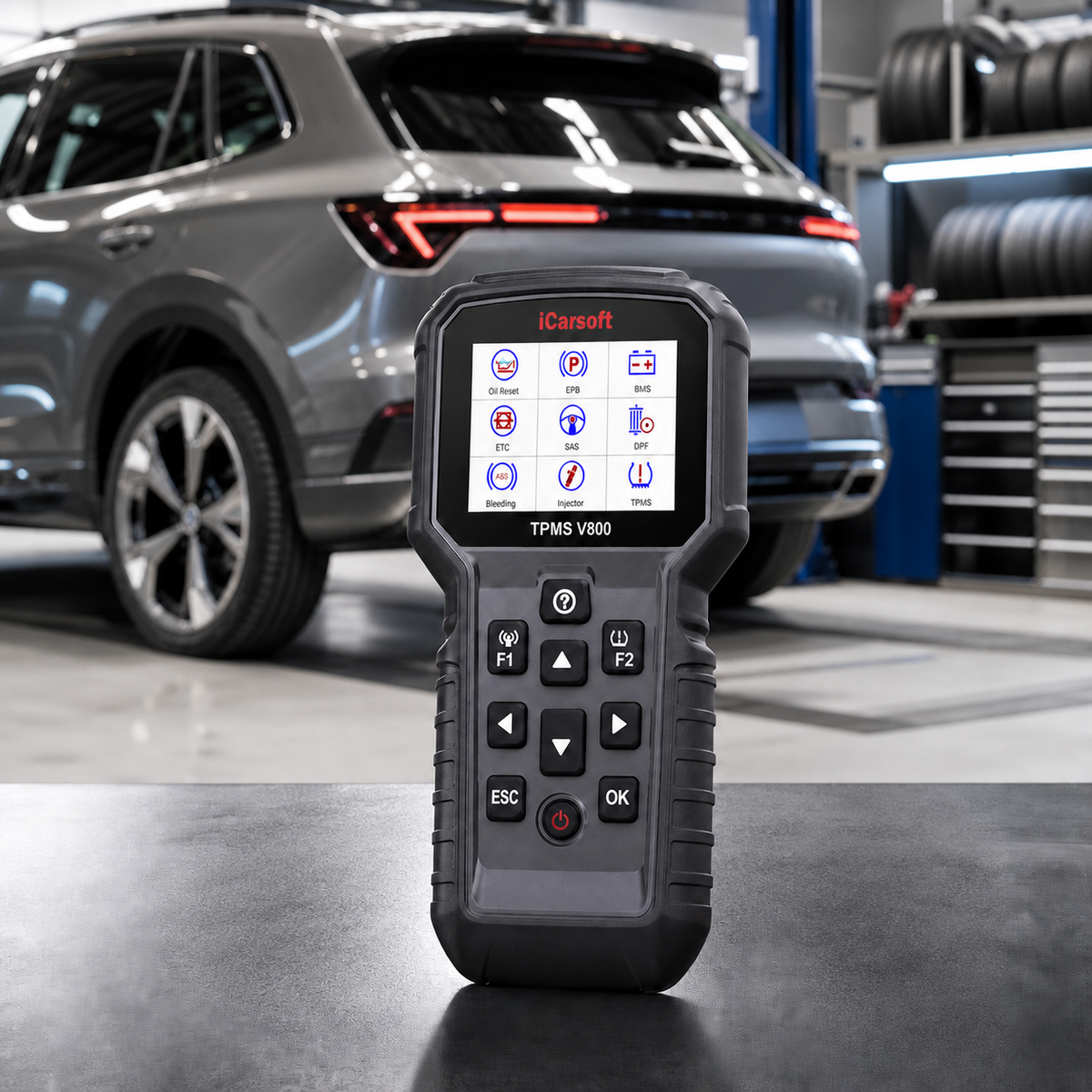
Confirm both sides of the job
Ask whether the tool supports activation of the installed sensor, programming of the exact replacement sensor and the vehicle's required relearn. A yes to one task is not a yes to all three.
VIN, year, model, market, frequency, sensor part number and required operation.

Frequently asked questions
Are TPMS activation and relearn the same?
No. Activation wakes a compatible direct sensor and reads its transmitted information. Relearn is the vehicle-side procedure that associates sensor IDs or wheel positions with the TPMS control system.
Do all replacement TPMS sensors need programming?
No. Some replacement sensors arrive with a fixed compatible protocol and ID, while configurable universal sensors must be programmed before installation. Confirm the sensor family, vehicle application and supplier instructions.
Can I relearn a sensor without activating it first?
Some vehicle procedures can learn sensors without a separate service-tool activation step, while others require each sensor to be triggered in a specified order. Follow the exact manufacturer procedure.
Does a TPMS reset button program a sensor?
Usually no. A dashboard reset or calibration command may initialize an indirect system or start a learning process. It does not automatically write software or an ID into a blank direct sensor.
What is the difference between direct and indirect TPMS?
Direct TPMS uses pressure sensors at the wheels. Indirect TPMS estimates pressure loss from wheel-speed and other vehicle data, so there may be no programmable in-wheel pressure sensor.
Can TPMS V800 program every aftermarket sensor?
The official listing says V800 can activate and decode many OE and aftermarket sensors, while programming is optimized for supported programmable sensors such as iCarsoft S6000. Confirm the exact sensor before purchase.
What information is needed for a compatibility check?
Provide the 17-character VIN, model year, make, model, market, direct or indirect TPMS type if known, OE sensor number, frequency, replacement sensor brand and part number, and the tool model and software version.
Sources and compatibility resources
-
Official TPMS V800 listing
Current tool functions, compatibility boundary and product status. -
iCarsoft technical explainer
Manufacturer distinction between activation, programming and relearn. -
TPMS S6000 listing
Compatible programmable replacement-sensor information. -
NHTSA TireWise
Direct and indirect TPMS overview and tire-safety context. -
iCarsoft function resources
Vehicle and function research starting point. -
Before You Buy
Vehicle-specific compatibility confirmation route.


